
RabbitFX Tutorial
Installation
Dependency
Using Cmake
Copy folder io to your program, and then you can integrate RabbitFX in your CMakeLists.txt:
AUX_SOURCE_DIRECTORY(. SOURCE_LIST)
ADD_LIBRARY(rabbitfx ${SOURCE_LIST})
TARGET_LINK_LIBRAIES(rabbitfx z)
Using build libray
mkdir build
cmake .. -DCMAKE_INSTALL_PREFIX=/your/install/path
make && make install
g++ -std=c++11 YOURFILE.cpp -I/your/install/path/include -L/your/install/path/lib -lrabbitfx -lz -lpthread
Build with libisal libray for processing gziped file faster
step1: install ISA-L
step2: build RabbitFX
mkdir build
cmake .. -DCMAKE_INSTALL_PREFIX=/your/install/path -DIGZIP_PREFIX=/path/to/libisal
make && make install
g++ -std=c++11 YOURFILE.cpp -I/your/install/path/include -L/your/install/path/lib -lrabbitfx -lz -lpthread
Highlight
RabbitFX highly support multi-core paltform
RabbitFX efficiency processing FASTQ/FASTA files
Concurrency data pool and data queue.
Non-copy read format
Bit-based sequencing processing
Illustration
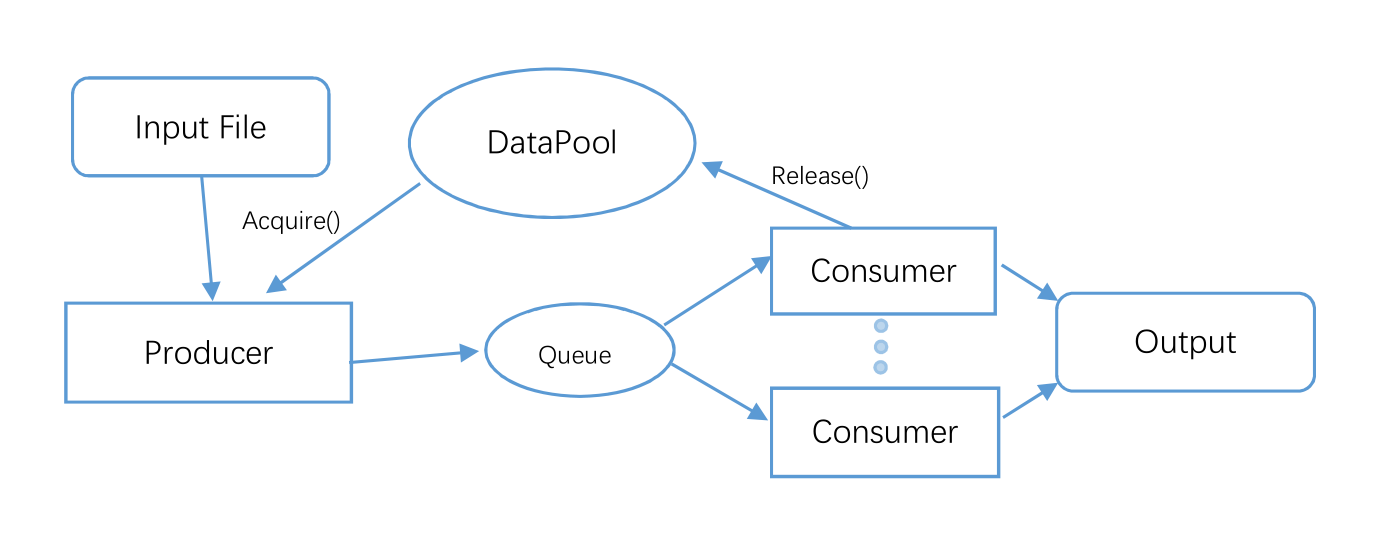
Case study
Runing Example in main.cpp and TestCount.cpp
cd RabbitFX
mkdir build && cd build
cmake ..
make
#then there is an test file in build file
time ./test
time ./testcount
Note: We integtated CLI as default command line patser for user convenience
FASTQ data example
Single-end data processing example
Example of define a mult-threading task
int test_fastq_se(int argc, char** argv){
  std::string file = "/home/old_home/haoz/workspace/QC/out_1.fq";
  //---------------cmd parser----------------
  CLI::App app{"Wellcome to RabbitFX"};
  CLI::Option* opt;
  std::string filename ;
  int th;
  app.add_option("-f, --file", filename, "input file name")
    ->default_val(file);
  app.add_option("-t, --threads", th, "worktreads")
    ->default_val(2);
  //----------------------------------------
  CLI11_PARSE(app, argc, argv);
  if(app.count("-f"))
    std::cout << "filename: " << filename << std::endl;
  else{
    std::cout << "-f not find, use default: " << filename << std::endl;
  }
  rabbit::fq::FastqDataPool *fastqPool = new rabbit::fq::FastqDataPool(32, 1<<22);
  rabbit::core::TDataQueue<rabbit::fq::FastqDataChunk> queue1(64, 1);
  std::thread producer(producer_fastq_task, filename, fastqPool, std::ref(queue1));
  std::thread** threads = new std::thread*[th];
  for(int t = 0; t < th; t++){
    threads[t] = new std::thread(std::bind(consumer_fastq_task, fastqPool, std::ref(queue1)));
  }
  producer.join();
  for(int t = 0; t < th; t++){
    threads[t]->join();
  }
  //-----free
  delete fastqPool;
  delete[] threads;
  return 0;
}
example of define producer and consumer task
int producer_fastq_task(std::string file, rabbit::fq::FastqDataPool* fastqPool, rabbit::core::TDataQueue<rabbit::fq::FastqDataChunk> &dq){
  rabbit::fq::FastqFileReader *fqFileReader;
  fqFileReader = new rabbit::fq::FastqFileReader(file, *fastqPool);
  rabbit::int64 n_chunks = 0;
  while(true){
    rabbit::fq::FastqDataChunk* fqdatachunk;// = new rabbit::fq::FastqDataChunk;
    fqdatachunk = fqFileReader->readNextChunk();
    if (fqdatachunk == NULL) break;
    n_chunks++;
    //std::cout << "readed chunk: " << n_chunks << std::endl;
    dq.Push(n_chunks, fqdatachunk);
  }
  dq.SetCompleted();
  std::cout << "file " << file << " has " << n_chunks << " chunks" << std::endl;
  return 0;
}

void consumer_fastq_task(rabbit::fq::FastqDataPool* fastqPool, rabbit::core::TDataQueue<rabbit::fq::FastqDataChunk> &dq){
    long line_sum = 0;
    rabbit::int64 id = 0;
    std::vector<neoReference> data;
    rabbit::fq::FastqDataChunk* fqdatachunk;// = new rabbit::fq::FastqDataChunk;
    data.resize(10000);
    while(dq.Pop(id, fqdatachunk)){
      line_sum += rabbit::fq::chunkFormat(fqdatachunk, data);
      fastqPool->Release(fqdatachunk);
    }
    std::cout << "line_sum: " << line_sum << std::endl;
}
Pair-end data processing example
An example of processing Pair-end sequencing data is showed in file TestCount.cpp. It is tested that compared to FQReader, in the task of counting ATCG of pair-end data, RabbitFX is 2 times faster in 20 thread.
RabbitFX is about 2G/s I/O speed now
FASTA data example
this is an example of reading and processing FASTA file
example code of using only one thread (count chunk number of input file):
int proces_fasta_task(std::string file) {
  rabbit::fa::FastaDataPool *fastaPool = new rabbit::fa::FastaDataPool(256, 1 << 22);
  rabbit::fa::FastaFileReader *faFileReader;
  faFileReader = new rabbit::fa::FastaFileReader(file, *fastaPool, false);
  int n_chunks = 0;
  int line_sum = 0;
  while (true) {
    rabbit::fa::FastaChunk *fachunk = new rabbit::fa::FastaChunk;
    fachunk = faFileReader->readNextChunkList();
    if (fachunk == NULL) break;
    n_chunks++;
    //-----relaease
    rabbit::fa::FastaDataChunk *tmp = fachunk->chunk;
    do {
      fastaPool->Release(tmp);
      tmp = tmp->next;
    } while (tmp != NULL);
    // line_sum += rabbit::fa::chunkFormat(*fachunk, data);
  }
  std::cout << "file " << file << " has " << line_sum << " lines" << std::endl;
  return 0;
}

int test_fasta(int argc, char** argv){
  producer_fasta_task("/home/old_home/haoz/workspace/data/hg19/hg19.fa");
  return 0;
}
Cite
RabbitFX paper is under review now.